Building Production-Grade Multi-Agent Systems in 2026: From OpenRouter Diagnostics to Kubernetes Scaling

By Abo-Elmakarem Shohoud | Ailigent
As we navigate the middle of 2026, the landscape of Artificial Intelligence has shifted from simple prompt engineering to complex, multi-agent orchestration. For business owners and CTOs, the challenge is no longer just getting an LLM to answer a question, but building a resilient, scalable, and cost-effective system that can handle autonomous tasks at scale. At Ailigent, we have seen that the difference between a failed pilot and a successful production deployment often lies in the architecture and the diagnostic rigor applied during the early stages.
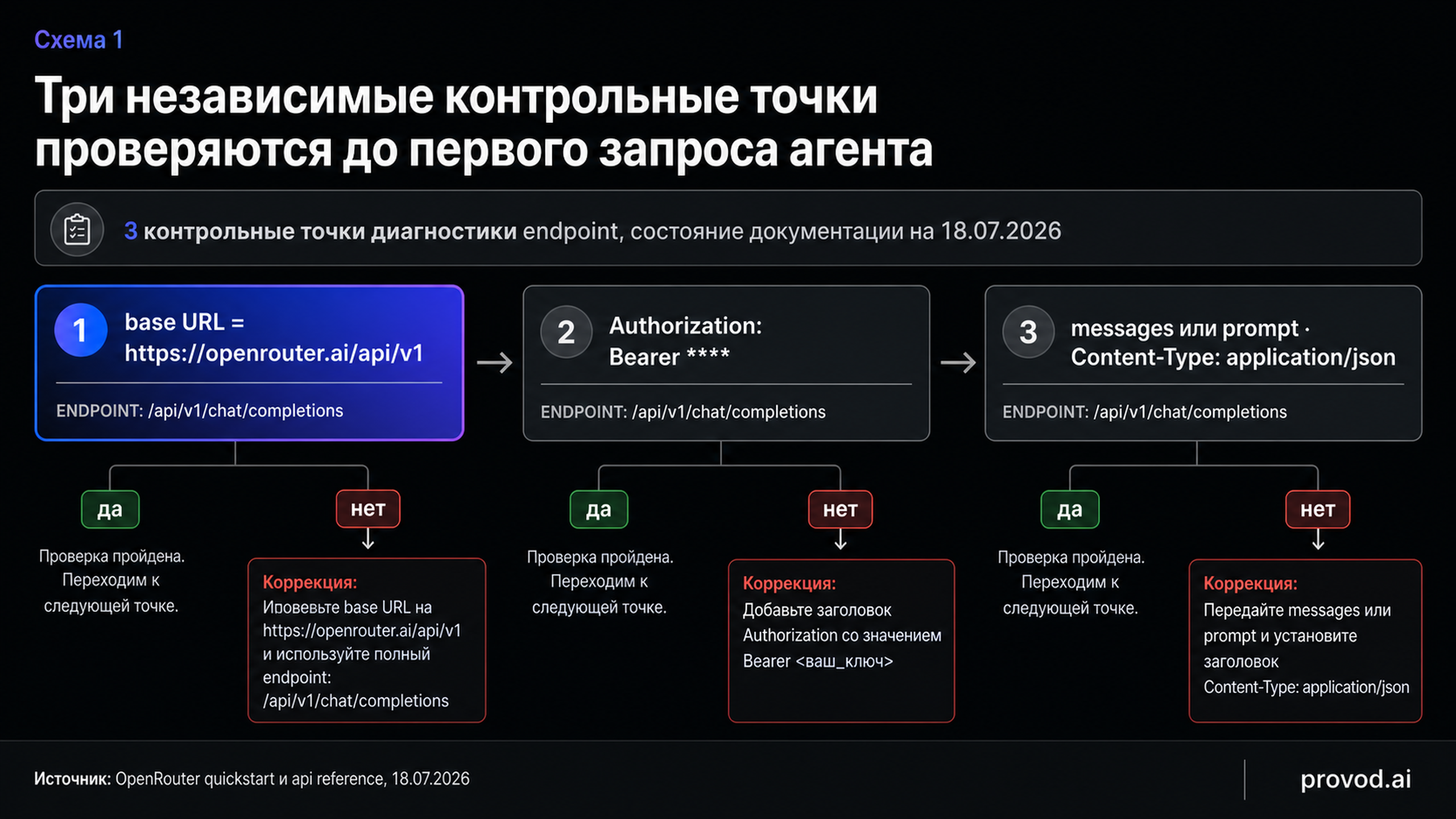 API OpenRouter и диагностический запрос перед интеграцией
Source: Dev.to AI
API OpenRouter и диагностический запрос перед интеграцией
Source: Dev.to AI
In this guide, we will walk through the professional pipeline for building enterprise-grade AI agent teams. We will cover everything from the initial diagnostic checks of your LLM provider to the sophisticated scaling of these agents using Kubernetes Operators.
Understanding the 2026 AI Stack
Before we dive into the technical steps, let's define the core components of our modern stack.
Agentic AI is a paradigm where AI systems are designed to autonomously use tools, make decisions, and collaborate with other agents to achieve complex goals without constant human intervention. Unlike traditional chatbots, agentic systems are goal-oriented and self-correcting.
A Kubernetes Operator is a method of packaging, deploying, and managing a Kubernetes application by extending the Kubernetes API to manage custom resources. In the context of AI, operators allow us to treat an AI agent team as a first-class citizen in our infrastructure, managing its lifecycle and scaling based on workload demands.
Comparison: Traditional Scripting vs. Agentic Orchestration
| Feature | Traditional Scripting (2023-2024) | Agentic Orchestration (2026) |
|---|---|---|
| Logic | Hard-coded IF/ELSE statements | Dynamic reasoning and tool use |
| Error Handling | Manual exception catching | Autonomous self-healing and retries |
| Scaling | Vertical (Larger servers) | Horizontal (K8s Operators) |
| Connectivity | Single API endpoints | Multi-provider routing (OpenRouter) |
| Maintenance | High (Code changes for every task) | Low (Context-driven adaptation) |
Prerequisites for the Build
To follow this guide, you will need the following:
- Python 3.12+: The standard for AI development in 2026.
- OpenRouter API Key: For unified access to the world's best models (GPT-5, Claude 4, etc.).
- Docker and Kubernetes Cluster: For containerization and scaling.
- CrewAI Library: For agent orchestration.
Step 1: The Diagnostic Phase – Avoiding the "Silent Failure" Trap
One of the most common mistakes developers make—and something we emphasize at Ailigent—is jumping straight into complex streaming and tool-calling before verifying the transport layer. As noted in recent industry insights, an agent often "fails" not because the AI is dumb, but because of a 3-line configuration error: a wrong base URL, a missing header, or a mismatched request body.
Before integrating OpenRouter into your CrewAI workflow, run this diagnostic script to ensure your "plumbing" is solid:
import requests
import json

def check_llm_transport(api_key, model="openai/gpt-4o"):
    url = "https://openrouter.ai/api/v1/chat/completions"
    headers = {
        "Authorization": f"Bearer {api_key}",
        "Content-Type": "application/json",
        "HTTP-Referer": "https://ailigent.ai", # Required by OpenRouter
        "X-Title": "Ailigent Diagnostic"
    }

    # Simple payload to test connectivity
    data = {
        "model": model,
        "messages": [{"role": "user", "content": "Respond with 'READY'"}]
    }

    try:
        response = requests.post(url, headers=headers, data=json.dumps(data))
        response.raise_for_status()
        print("Transport Layer: SUCCESS")
        print(f"Response: {response.json()['choices'][0]['message']['content']}")
    except Exception as e:
        print(f"Transport Layer: FAILED. Error: {e}")

# Usage
check_llm_transport("your_openrouter_key")
Why this matters: In 2026, with the sheer volume of API traffic, intermediate proxies can often strip headers. This simple test saves you hours of debugging "silent" agent failures where the model simply never receives the request.
 How to Build Kubernetes Operators: A Handbook for Devs
Source: freeCodeCamp
How to Build Kubernetes Operators: A Handbook for Devs
Source: freeCodeCamp
Step 2: Orchestrating the Team with CrewAI
Once connectivity is confirmed, we move to the orchestration layer. CrewAI allows us to define roles, goals, and backstories for our agents, creating a collaborative environment.
Let’s build a Market Research & Strategic Content Team. This team consists of a Researcher and a Writer.
from crewai import Agent, Task, Crew, Process

# Define the Researcher
researcher = Agent(
  role='Senior Market Analyst',
  goal='Identify emerging trends in AI automation for July 2026',
  backstory="""You are an expert at spotting technological shifts.
  You work for Abo-Elmakarem Shohoud at Ailigent, focusing on business ROI.""",
  verbose=True,
  allow_delegation=False
)

# Define the Writer
writer = Agent(
  role='Tech Content Strategist',
  goal='Write a compelling blog post about AI trends',
  backstory="""You transform complex technical data into actionable business insights.""",
  verbose=True,
  allow_delegation=True
)

# Create Tasks
task1 = Task(description="Analyze the state of K8s Operators for AI in 2026.", agent=researcher)
task2 = Task(description="Draft a 1500-word guide based on the analysis.", agent=writer)

# Instantiate the Crew
crew = Crew(
  agents=[researcher, writer],
  tasks=[task1, task2],
  process=Process.sequential # Sequential workflow
)

result = crew.kickoff()
print(result)
In this setup, Abo-Elmakarem Shohoud's vision of "Ailigent" is embedded into the agents' backstories, ensuring the output aligns with corporate identity and specific 2026 market contexts.
Step 3: Scaling with Kubernetes Operators
Running a script on your laptop is fine for a demo, but enterprise AI requires 99.9% availability. This is where Kubernetes Operators come in.
Traditionally, you would deploy a simple Pod. However, an AI Operator can monitor the token usage, cost, and latency of your agents. If a specific agent task is taking too long or hitting rate limits on OpenRouter, the Operator can automatically spin up additional replicas or switch to a fallback model (e.g., switching from Claude 4 to a local Llama 3.5 instance).
How to Implement an AI Operator:
- Define a Custom Resource Definition (CRD): Define a
AIAgentTeamresource in K8s. - The Controller Loop: Write a controller in Go or Python (using Kopf) that watches for these resources.
- Lifecycle Management: The operator ensures that if an agent process crashes due to an API timeout, it is restarted with the last known state preserved in a persistent volume.
By treating your AI agents as managed resources, you move from "managing scripts" to "managing an AI workforce."
Troubleshooting Common 2026 Integration Issues
Even with the best architecture, issues arise. Here is how to solve the top three problems we see at Ailigent:
- Context Window Overload: As of 2026, models have massive context windows (1M+ tokens), but performance degrades at the edges. Fix: Implement RAG (Retrieval-Augmented Generation) to feed only relevant snippets rather than the entire database.
- Rate Limiting at the Provider Level: If you are using OpenRouter, you might hit limits on high-demand models. Fix: Implement a multi-model fallback strategy in your CrewAI configuration.
- Inconsistent JSON Outputs: Even the best models occasionally hallucinate JSON syntax. Fix: Use Pydantic for data validation and force the model to retry if the schema check fails.
Key Takeaways
- Diagnostics First: Always verify your API transport layer with a 3-line script before building complex agent logic. Most "AI failures" are actually configuration errors.
- Orchestration is Key: Use frameworks like CrewAI to define clear roles and goals. This ensures your AI agents work as a cohesive team rather than isolated scripts.
- Scale with Intent: For production environments in 2026, use Kubernetes Operators to manage the lifecycle, scaling, and fault tolerance of your AI agent workforce.
- Focus on Business Value: Whether you are working with Abo-Elmakarem Shohoud or building your own startup, ensure your agents are programmed with a "backstory" that prioritizes ROI and practical outcomes.
The Bottom Line: Building AI in 2026 is an engineering discipline. By combining robust diagnostics, intelligent orchestration, and cloud-native scaling, you can transform AI from a novelty into a dependable pillar of your business infrastructure.
Related Videos
Agentic RAG vs RAGs
Channel: Rakesh Gohel
How LangChain Works to Create AI Agents | Explained Simply #LangChain #aiagent #aiframework
Channel: Amine DALY