دليل 2026 لبناء وكلاء الذكاء الاصطناعي المرنين: إتقان LangGraph وMCP وCode Mode

بقلم أبوالمكارم شهود | Ailigent
مقدمة: ثورة الوكلاء في عام 2026
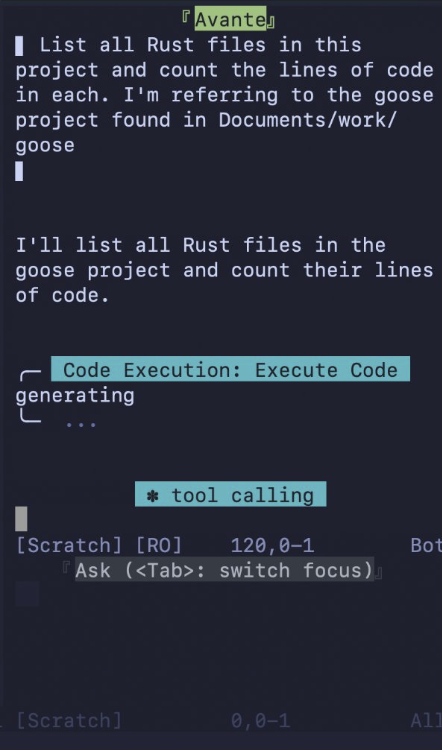 صورة توضيحية: 8 Things You Didn't Know About Code Mode
المصدر: Dev.to AI
صورة توضيحية: 8 Things You Didn't Know About Code Mode
المصدر: Dev.to AI
اعتبارًا من 19 فبراير 2026، شهد مشهد تطوير البرمجيات وأتمتة الأعمال تحولًا جذريًا. لم نعد في عصر روبوتات الدردشة البسيطة التي تستجيب للمطالبات الثابتة. بدلاً من ذلك، دخلنا عصر "الذكاء الاصطناعي الوكيل" (Agentic AI).
الذكاء الاصطناعي الوكيل هو نموذج تستخدم فيه الأنظمة المستقلة مجموعة من الأدوات لأداء مهام معقدة ومتعددة الخطوات بأقل تدخل بشري. هذا العام، انتقل التركيز من مجرد بناء الوكلاء إلى ضمان مرونتهم، والحفاظ على السياق لفترات طويلة، وتقديم واجهات تفاعلية تتجاوز "جدار النص".
في هذا الدليل، سأقوم أنا، أبوالمكارم شهود، بمرافقتكم عبر التقنيات المتقدمة المطلوبة لبناء وكلاء عاليي الأداء باستخدام LangGraph وبروتوكول سياق النموذج (MCP). سواء كنت صاحب عمل يتطلع إلى أتمتة العمليات في Ailigent أو محترفًا تقنيًا يصقل مهاراته، فإن هذه الرؤى مصممة لتقديم قيمة فورية.
ما ستنجزه
باتباع هذا الدليل، ستتعلم كيفية:
- هندسة وكلاء يحافظون على الحالة (Stateful) ولا يفقدون طريقهم خلال الجلسات الطويلة.
- تنفيذ بروتوكول سياق النموذج (MCP) لتقديم واجهات مستخدم تفاعلية.
- مكافحة "تآكل السياق" (Context Rot) - التحدي الرئيسي لمهام العمل الوكيل في 2026.
- الاستفادة من "وضع الكود" (Code Mode) لإلغاء الوساطة في دورات التطوير التقليدية.
المتطلبات الأساسية
- بيئة تطوير باستخدام Python 3.11+ أو Node.js 22+.
- الوصول إلى واجهة برمجة تطبيقات (API) لنماذج الطليعة (مثل Claude 4 أو GPT-5).
- الإلمام بالبرمجة غير المتزامنة (Asynchronous programming).
- تثبيت مضيف متوافق مع MCP (مثل Goose أو إصدار Cursor 2026).
الخطوة 1: هندسة التدفق الوكيل باستخدام LangGraph
السلاسل الخطية التقليدية لم تعد كافية لتعقيدات متطلبات عام 2026. LangGraph هي مكتبة مصممة لبناء تطبيقات متعددة الفاعلين وذات حالة مع نماذج اللغة الكبيرة من خلال تمثيل سير العمل كرسوم بيانية (Graphs). على عكس السلاسل البسيطة، تسمح LangGraph بالدورات (Cycles)، وهي ضرورية للوكلاء الذين يحتاجون إلى التصحيح الذاتي أو تكرار المهمة.
تعريف الحالة (State)
الخطوة الأولى هي تعريف "الحالة". في LangGraph، الحالة هي مخطط مشترك يمكن لجميع العقد في الرسم البياني الخاص بك القراءة منه والكتابة فيه.
from typing import TypedDict, Annotated, Sequence
from langchain_core.messages import BaseMessage
from langgraph.graph import StateGraph, END

class AgentState(TypedDict):
    messages: Annotated[Sequence[BaseMessage], "تاريخ المحادثة"]
    context_health: float  # مقياس نستخدمه في 2026 لتتبع تآكل السياق
    current_task: str
بناء العقد (Nodes)
العقد هي لبنات بناء الوكيل الخاص بك. تمثل كل عقدة وظيفة أو استدعاء أداة. من خلال هيكلة وكيلك بهذه الطريقة، تضمن أنه إذا فشل الوكيل في خطوة معينة، يتم الحفاظ على الحالة، مما يسمح بالتعافي السهل.
الخطوة 2: تنفيذ بروتوكول سياق النموذج (MCP)
أحد أكبر الاختراقات هذا العام هو الاعتماد الواسع لبروتوكول MCP.
MCP (Model Context Protocol) هو معيار مفتوح يمكّن وكلاء الذكاء الاصطناعي من توفير مكونات واجهة مستخدم منظمة وتفاعلية - مثل المخططات أو النماذج أو الخرائط - مباشرة داخل واجهة الدردشة.
بدلاً من قيام وكيلك بشرح اتجاه بيانات معقد في 500 كلمة، يمكنه الآن عرض مكون React تفاعلي ومباشر. هذا أمر بالغ الأهمية لأصحاب الأعمال الذين يحتاجون إلى اتخاذ قرارات سريعة بناءً على البيانات. في Ailigent، وجدنا أن الانتقال من التقارير النصية إلى لوحات المعلومات التفاعلية المدعومة بـ MCP يزيد من مشاركة أصحاب المصلحة بنسبة 40%.
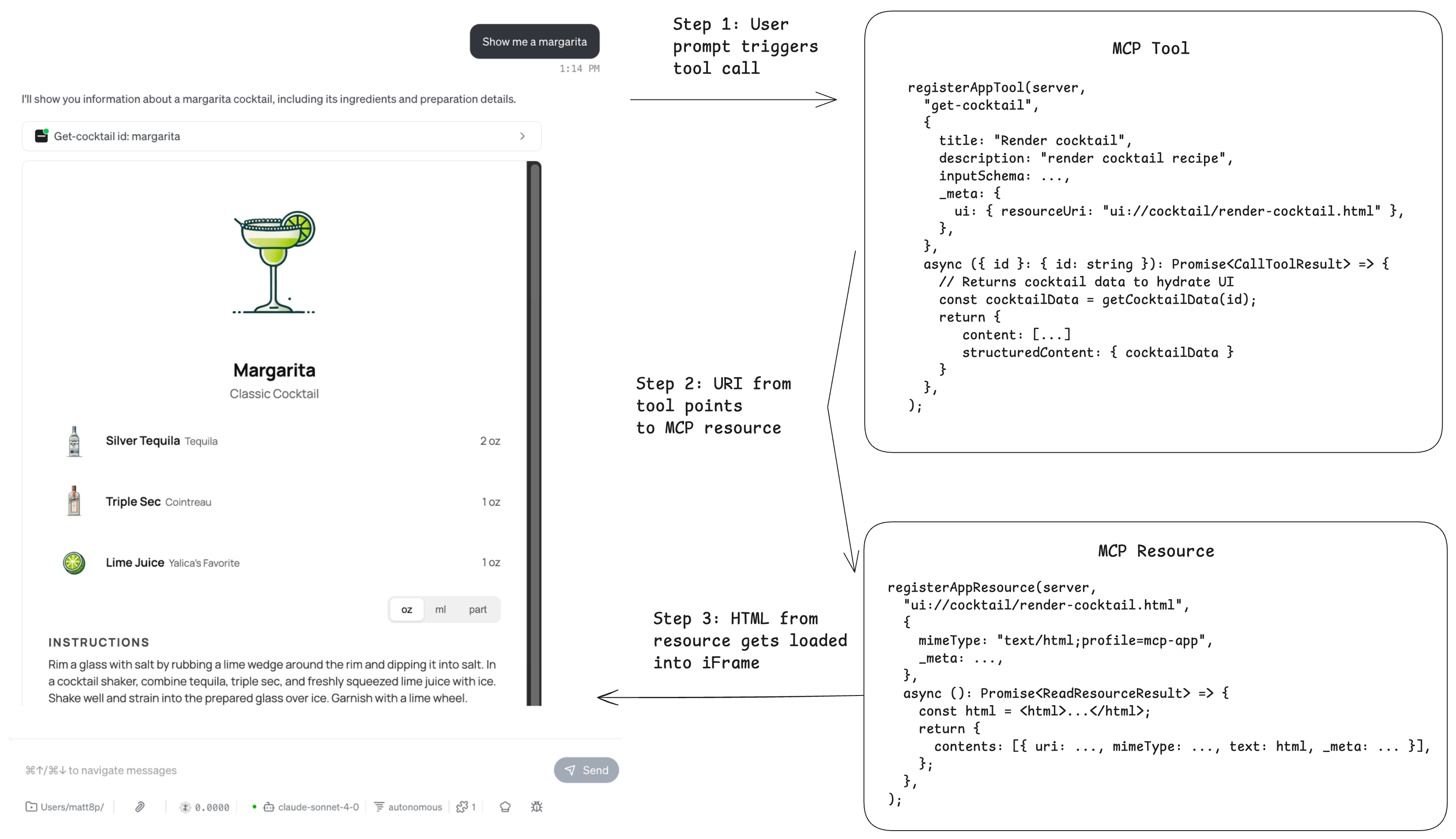 صورة توضيحية: 5 Tips for Building MCP Apps That Work
المصدر: Dev.to AI
صورة توضيحية: 5 Tips for Building MCP Apps That Work
المصدر: Dev.to AI
كيفية بناء أداة MCP
عند بناء تطبيق MCP، ركز على نهج "واجهة المستخدم أولاً". يجب أن يعيد وكيلك حمولة JSON منظمة يفسرها مضيف MCP كعنصر مرئي.
- نصيحة: استخدم الأزرار للإجراءات الشائعة. النقر على زر دائمًا ما يكون أكثر موثوقية من تخمين الوكيل لما يريده المستخدم بعد ذلك.
الخطوة 3: إتقان "Code Mode" للتطوير السريع
قام "وضع الكود" (Code Mode) بإلغاء الوساطة في سير عمل التطوير التقليدي. في عام 2026، يستخدم المطورون الوكلاء لتنفيذ مهام معقدة بشكل مستقل داخل بيئات التطوير الخاصة بهم (IDEs). وهذا يعني وقتًا أقل في التنقل بين الأدوات المتخصصة واعتمادًا أقل على الفرق الأخرى.
ومع ذلك، فإن استخدام Code Mode بفعالية يتطلب فهم حدوده. يعمل الوكلاء في Code Mode بشكل أفضل عندما يكون لديهم نطاق واضح. بدلاً من قول "ابنِ نظام CRM"، استخدم Code Mode لـ "تنفيذ تدفق OAuth2 لتكامل Google في نظام CRM".
| الميزة | التطوير التقليدي (ما قبل 2025) | وضع الكود الوكيل (2026) |
|---|---|---|
| سير العمل | ترميز يدوي، اختبار يدوي | تنفيذ بقيادة الوكيل، تحقق آلي |
| الأدوات | IDE منفصل، CLI، متصفح | بيئة موحدة تدعم MCP |
| السرعة | 1x الأساس | 5x - 10x مع الدورات الوكيلة |
| معالجة الأخطاء | تصحيح أخطاء يدوي | دورات برمجية ذاتية الإصلاح |
الخطوة 4: حل مشكلة "تآكل السياق"
أكبر تحدٍ نواجهه في عام 2026 هو تآكل السياق (Context Rot). نظرًا لأن الوكلاء لديهم نوافذ ذاكرة محدودة، فإن الجلسة التي تستمر لفترة طويلة تتسبب في قيام الوكيل بـ "نسيان" التعليمات السابقة أو فقدان منطق المشروع.
لحل هذه المشكلة، قم بتنفيذ "عقدة تلخيص" (Summarization Node) في LangGraph الخاص بك. كل 10 رسائل، يجب على الوكيل تفعيل خطوة تفكير ذاتي حيث يلخص الحالة الحالية للمشروع ويحذف التاريخ غير الضروري. هذا يحافظ على "صحة السياق" عالية.
استكشاف أخطاء تآكل السياق وإصلاحها
- الأعراض: يبدأ الوكيل في تكرار نفسه أو تجاهل التعليمات الأخيرة.
- الحل: امسح الذاكرة المؤقتة يدويًا أو قم بتنفيذ نظام "نقطة تفتيش" (Checkpoint) حيث يحفظ الوكيل تقدمه في قاعدة بيانات مستمرة كل 5 دقائق.
الخطوة 5: الاختبار والنشر
يختلف اختبار سير العمل الوكيل عن اختبار البرامج القياسية. أنت لا تختبر الكود فحسب؛ بل تختبر التفكير الاستنتاجي. استخدم "Evals" (التقييمات) لتشغيل وكيلك عبر 50-100 سيناريو وقياس معدل نجاحه.
في عام 2026، نستخدم اختبار "وكيل ضد وكيل"، حيث يعمل أحد أنظمة الذكاء الاصطناعي كمستخدم فوضوي يحاول كسر النظام، بينما يحاول ذكاء اصطناعي مطور الحفاظ على سير العمل.
استكشاف الأخطاء وإصلاحها
- الحلقات اللانهائية: إذا دخل LangGraph في دورة يستمر فيها الوكيل في استدعاء نفس الأداة، فقم بتنفيذ عداد
max_iterationsفي حالتك لفرض الخروج. - أخطاء عرض MCP: تأكد من أن مضيف MCP الخاص بك يدعم الإصدار المحدد من البروتوكول الذي تستخدمه. في عام 2026، يعد إصدار البروتوكول أمرًا بالغ الأهمية حيث يتطور المعيار شهريًا.
- زمن الاستجابة (Latency): تتضمن مهام العمل الوكيلة مكالمات متعددة لنماذج اللغة. استخدم نماذج أصغر وأسرع للتوجيه ونماذج أكبر (مثل Claude 4) فقط لعقد التفكير الأساسية.
النقاط الرئيسية المستفادة
- الحالة هي الأهم: استخدم LangGraph للحفاظ على حالة قوية وقابلة للاسترداد عبر الجلسات الطويلة.
- المرئيات أفضل من النص: اعتمد MCP لتحويل وكيلك من مجرد روبوت دردشة إلى تطبيق وظيفي مع مكونات واجهة مستخدم تفاعلية.
- إدارة الذاكرة الاستباقية: كافح تآكل السياق من خلال تنفيذ التلخيص الدوري والحذف داخل دوراتك الوكيلة.
- إلغاء الوساطة باستخدام Code Mode: استخدم أدوات IDE الوكيلة لتسريع التطوير، ولكن اجعل المهام محددة لضمان دقة عالية.
- ثق ولكن تحقق: قم دائمًا بتنفيذ طبقة تقييم لمراقبة جودة تفكير وكلائك في السيناريوهات الواقعية.
من خلال اتباع معايير عام 2026 هذه، يمكنك بناء أتمتة لا تستجيب فحسب، بل تؤدي بالفعل. في Ailigent، نؤمن بأن المستقبل ينتمي لأولئك الذين يمكنهم إدارة هذه الأنظمة الذكية بدقة.
فيديوهات ذات صلة
LangGraph Complete Course for Beginners – Complex AI Agents with Python
القناة: freeCodeCamp.org
RoadMap to learn Agentic AI #ai #agenticai #education
القناة: The DotNet Office