دليل 2026 للذكاء الاصطناعي الطرفي: احتراف معالجة الصور عبر المتصفح ومساعدات OpenCode البرمجية

بقلم أبوالمكارم شهود | Ailigent
مقدمة: التحول نحو الذكاء المحلي في عام 2026
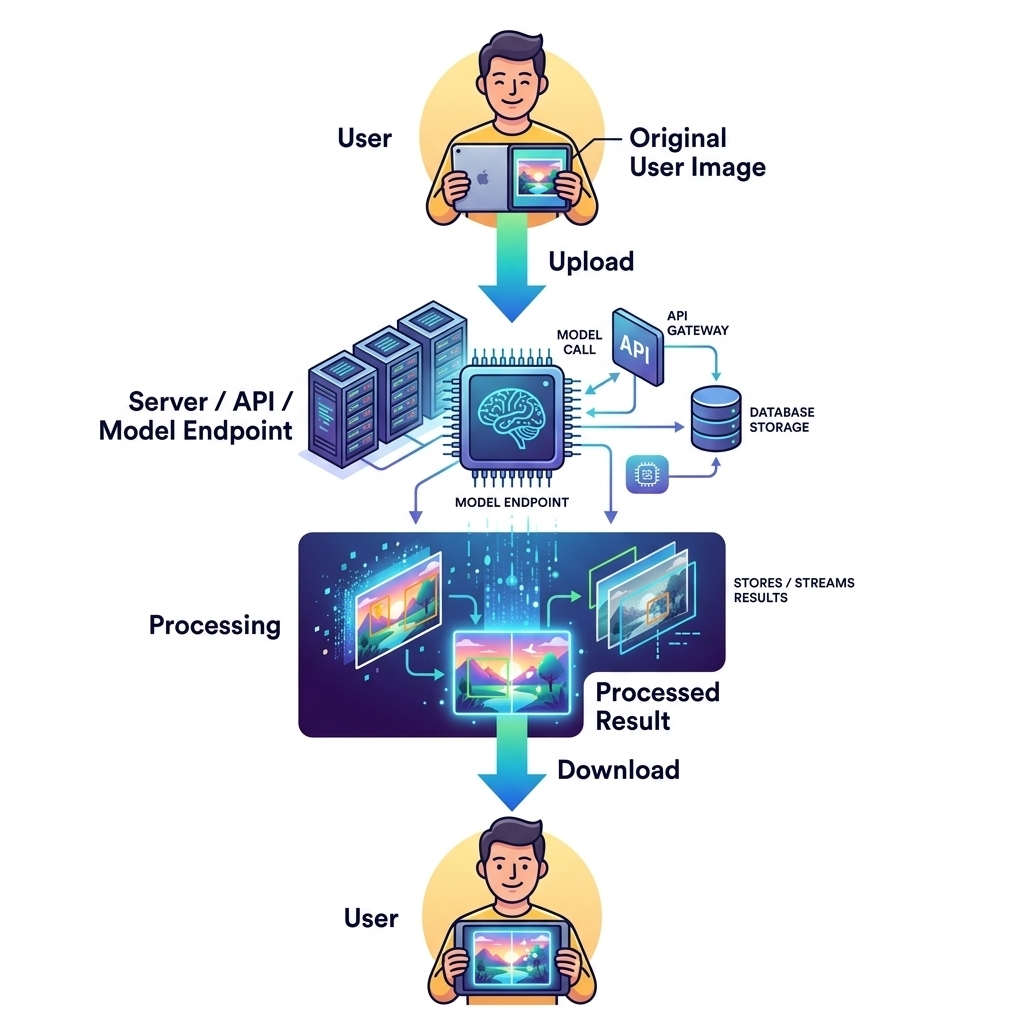 صورة توضيحية: Browser AI vs Cloud APIs for Image Processing
المصدر: Dev.to AI
صورة توضيحية: Browser AI vs Cloud APIs for Image Processing
المصدر: Dev.to AI
اعتبارًا من 14 مايو 2026، تحول مشهد الذكاء الاصطناعي من النموذج المركزي السحابي إلى نهج لامركزي يعتمد على الأجهزة الطرفية (Edge-first). بالنسبة لأصحاب الأعمال والمطورين، التحدي الرئيسي هذا العام ليس مجرد "كيفية استخدام الذكاء الاصطناعي"، بل "كيفية تشغيله بكفاءة وبتكلفة معقولة". مع ارتفاع تكاليف واجهة برمجة تطبيقات السحابة وتشديد لوائح خصوصية البيانات في منطقة الشرق الأوسط وشمال إفريقيا وعالميًا، أصبحت القدرة على معالجة البيانات محليًا — سواء في متصفح المستخدم أو على الجهاز المحلي للمطور — ضرورة تنافسية.
في هذا الدليل، سنستكشف تقنيتين تحوليتين تحددان عام 2026: الذكاء الاصطناعي القائم على المتصفح لمعالجة الصور، وOpenCode للتطوير البرمجي بلغة بايثون بمساعدة الذكاء الاصطناعي. سواء كنت تدير موقعًا متخصصًا للتجارة الإلكترونية (مثل تلك التي تبيع منتجات ECDS للعناية بالقدم) أو تبني برمجيات مؤسسية معقدة في Ailigent، فإن هذه الأدوات ستعيد تعريف كفاءتك التشغيلية.
الذكاء الاصطناعي في المتصفح هو تقنية تسمح لنماذج التعلم الآلي بالعمل مباشرة على الأجهزة المحلية للمستخدم عبر متصفح الويب، مما يلغي الحاجة إلى المعالجة من جانب الخادم. يمثل هذا التحول خطوة نحو "الذكاء الاصطناعي الوكيل" (Agentic AI).
الذكاء الاصطناعي الوكيل (Agentic AI) هو نموذج حيث يمكن لأنظمة الذكاء الاصطناعي تخطيط وتنفيذ مهام متعددة الخطوات بشكل مستقل لتحقيق هدف محدد بأقل تدخل بشري، وغالبًا ما تعمل مباشرة داخل البيئة المحلية للمستخدم.
لماذا نبتعد عن واجهات برمجة تطبيقات السحابة؟
لسنوات، كان سير العمل القياسي لمعالجة الصور هو: الرفع، انتظار الخادم، ثم التنزيل. ورغم كونه قابلاً للتوسع، إلا أن هذا النموذج يسبب تأخيرًا وتكاليف باهظة. في عام 2026، نشهد هجرة جماعية نحو المعالجة من جانب العميل (Client-Side).
مقارنة: واجهات برمجة تطبيقات السحابة مقابل الذكاء الاصطناعي في المتصفح (مشهد 2026)
| الميزة | واجهات السحابة (مثل OpenAI) | ذكاء المتصفح (Wasm/WebGPU) |
|---|---|---|
| التكلفة لكل طلب | $0.01 - $0.05 | $0.00 (صفر) |
| زمن الاستجابة | 2-5 ثوانٍ (حسب الشبكة) | أقل من 500 ملي ثانية |
| الخصوصية | البيانات تترك جهاز المستخدم | البيانات تبقى محلية |
| دعم العمل بدون إنترنت | لا | نعم |
| القابلية للتوسع | محدودة بالميزانية | غير محدودة (موارد العميل) |
الجزء الأول: كيفية تنفيذ إزالة خلفية الصور عبر المتصفح
في عام 2026، يتوقع المستهلكون نتائج فورية. إذا كنت تبيع "منتجات العناية بالقدم للبشرة الصلبة"، فإن توفير أداة حيث يمكن للمستخدمين رفع صورة لتقدمهم ومعالجتها فورًا دون انتظار هو فوز كبير لتجربة المستخدم.
المتطلبات الأساسية
- معرفة أساسية بلغة JavaScript/TypeScript.
- متصفح حديث يدعم WebGPU (قياسي في عام 2026).
- الوصول إلى مكتبة
Transformers.jsأو بيئات تشغيل ONNX المماثلة.
الخطوة 1: إعداد البيئة المحلية
أولاً، قم بتهيئة مشروعك وتثبيت المكتبات اللازمة لتشغيل النماذج محليًا في المتصفح.
// التثبيت عبر npm
// npm install @xenova/transformers

import { pipeline } from '@xenova/transformers';
 صورة توضيحية: Foot Care Products Hard Skin – Best Foot Care Products for Smooth & Healthy Feet by ECDS
المصدر: Dev.to AI
صورة توضيحية: Foot Care Products Hard Skin – Best Foot Care Products for Smooth & Healthy Feet by ECDS
المصدر: Dev.to AI
الخطوة 2: تحميل نموذج تقسيم الصور
بدلاً من استدعاء واجهة برمجة تطبيقات، نقوم بتحميل نموذج مسبق التدريب (مثل MODNet) في ذاكرة المتصفح.
const remover = await pipeline('image-segmentation', 'Xenova/modnet');
الخطوة 3: معالجة الصورة محليًا
عندما يختار المستخدم صورة، تتم المعالجة على وحدة معالجة الرسومات (GPU) الخاصة به باستخدام WebGPU، وليس خادمك.
async function removeBackground(imageElement) {
    const output = await remover(imageElement.src);
    document.getElementById('result').src = output.canvas.toDataURL();
}
القيمة التجارية
من خلال تنفيذ ذلك في Ailigent، ساعدنا العملاء على تقليل فواتير السحابة الشهرية بنسبة تصل إلى 70%. بالنسبة لشركة تتعامل مع 100,000 صورة شهريًا، يمثل ذلك توفيرًا يقارب 2,000 دولار أمريكي شهريًا بأسعار عام 2026.
الجزء الثاني: كيفية استخدام OpenCode لمساعدة البرمجة ببايثون
وصلت كفاءة البرمجة إلى آفاق جديدة في عام 2026 مع أدوات مثل OpenCode. OpenCode هو مساعد برمجي مفتوح المصدر يسد الفجوة بين التطوير المحلي ونماذج اللغة الكبيرة القوية (LLMs).
المتطلبات الأساسية
- تثبيت Python 3.12+.
- مفتاح Gemini API (إصدار 2026).
- الوصول إلى الجهاز الطرفي (Terminal).
الخطوة 1: تثبيت OpenCode
يسمح لك OpenCode بإعادة صياغة وتحليل الكود مباشرة من واجهة سطر الأوامر الخاصة بك.
pip install opencode-ai
الخطوة 2: التكوين باستخدام Gemini API
استخدم مفتاح واجهة برمجة التطبيقات الخاص بك لتهيئة الأداة:
export OPENCODE_API_KEY='your_gemini_api_key_2026'
الخطوة 3: تحسين سكربت بايثون
اطلب من OpenCode تحسين وظيفة معينة للأداء العالي.
opencode analyze main.py --task "Optimize this for high-concurrency 2026 standards"
حل المشكلات الشائعة في عام 2026
- عدم اكتشاف WebGPU: تأكد من تحديث متصفحك إلى أحدث إصدار لعام 2026. قد تتطلب بعض الأجهزة القديمة WebAssembly (Wasm) كبديل.
- أخطاء تحميل النموذج: إذا كان النموذج المحلي كبيرًا جدًا، فقد يفشل. يوصي أبوالمكارم شهود دائمًا باستخدام إصدارات مكممة (Quantized) من النماذج.
النقاط الرئيسية المستفادة
- لامركزية الذكاء الاصطناعي: في عام 2026، يؤدي نقل معالجة الصور إلى المتصفح عبر WebGPU إلى القضاء على تكاليف الخادم.
- اعتماد المساعدين مفتوحي المصدر: توفر أدوات مثل OpenCode بديلًا أكثر خصوصية للمنصات المغلقة.
- التركيز على زمن الاستجابة: الاستجابة الفورية هي المعيار الذهبي لتجربة المستخدم في عام 2026.
- سيادة البيانات: من خلال الاحتفاظ بالبيانات على جهاز المستخدم، تتجنب التعقيدات القانونية لنقل البيانات عبر الحدود.
الخلاصة: مع تقدمنا في عام 2026، سيكون الفائزون في المجال التقني هم من يتقنون التوازن بين النماذج السحابية القوية والتنفيذ المحلي الفعال. في Ailigent، نواصل دفع حدود ما هو ممكن مع الأتمتة الطرفية لتزويد عملائنا بأسرع وأكثر الحلول أمانًا المتاحة اليوم.
فيديوهات ذات صلة
Google Gemma 4 Tutorial - Run AI Locally for Free
القناة: Teacher's Tech
Gemma 4 Just Got Way More Powerful with Open WebUI
القناة: Teacher's Tech